
BackTrack
iPhone, iPad & Mac Tracks
A backing-track player for Mac, iPad and iPhone, built for MIDI-controlled playback, click, lighting and video cues in a live show. Designed for simple, easy use with Device Redundancy and Remote control.

Built for the room, not the studio
Everything you need to play live.
BackTrack is a backing-track player for musicians, bands, dancers, speakers and commercial AV teams. It is built around MIDI-controlled playback, so a click, a lighting cue and a video cue are all scheduled against the same song clock instead of being chased by hand during the show.
Unlike a generic media player, it is designed around redundancy. A single laptop running iTunes is a single point of failure. BackTrack uses a Device Link role and connection model, so a second device can sit ready as a standby slave, while live mode keeps device link status, audio-output counts and MIDI-device counts on screen at all times.
The rest is about not making mistakes under pressure: press-and-hold protection on Stop and Next. a Play control that locks once a song is running, a read-only Song Check that reports what is missing before you walk on, and a timeline precise enough to put a lighting cue exactly where it belongs.
The tour ready player for iphone
Quick Specs
- Multi Track Audio - Play separate backing, click and cue tracks instead of one mixed MP3.
- Route each track to its own mixer or audio-interface output.
- Control individual track volume, mono/stereo routing and channel swapping.
- Build, rename and reorder setlists with automatic total running time.
- Large Play, Stop and Next controls designed for live performance.
- Markers for verses, choruses, bridges and other song sections.
- Click Track Generator
- MIDI patch and equipment changes at exact timeline positions.
-Includes RigBridge for easy guitar processor control instead of remembering raw MIDI PC and CC numbers.
- Synchronise VSDMX lighting scenes through the native SoniLink connection.
- Play song-synchronised video through a window or external display.
- Use your Phone or Tablet as a Remote control for the Main BackTrack Device
- Redundancy options unavailable in ordinary music players.If you have multiple devices both will sync and play incase of hardware failure
- Stereo / 4 / 8 Outputs
One show, every screen
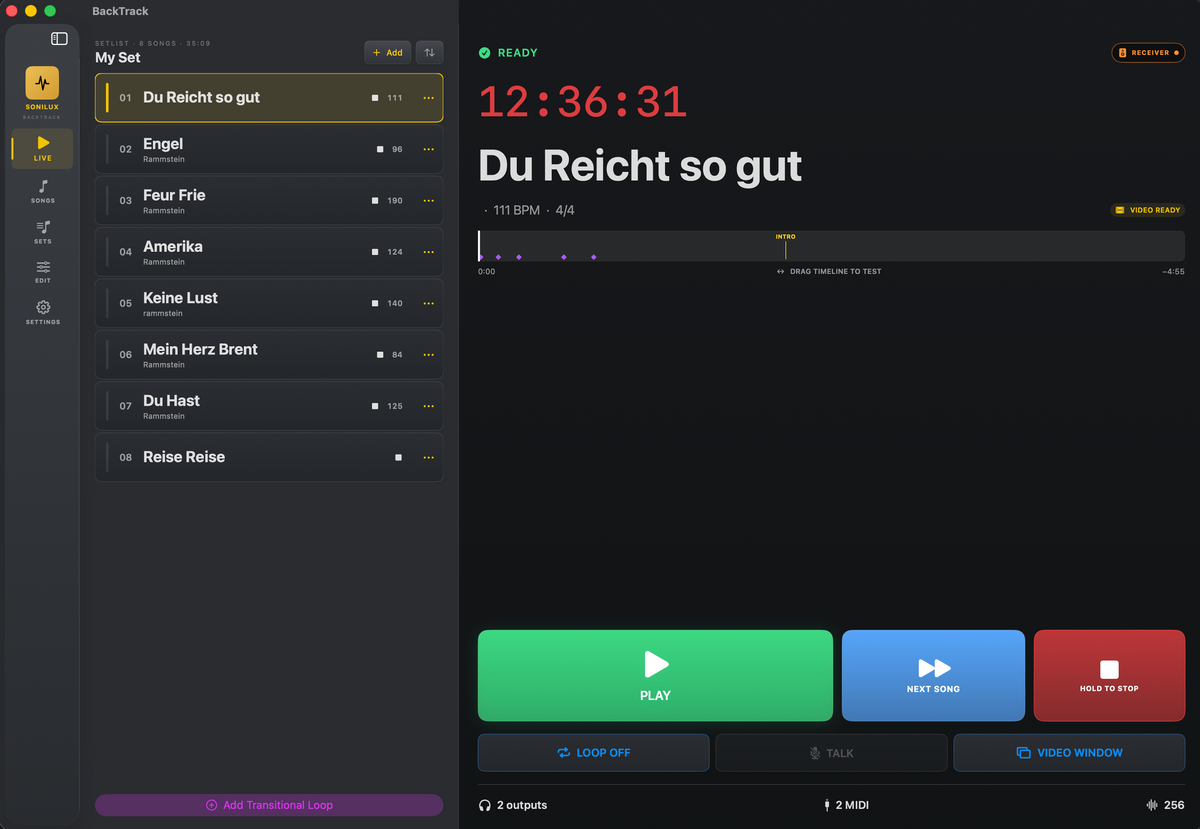
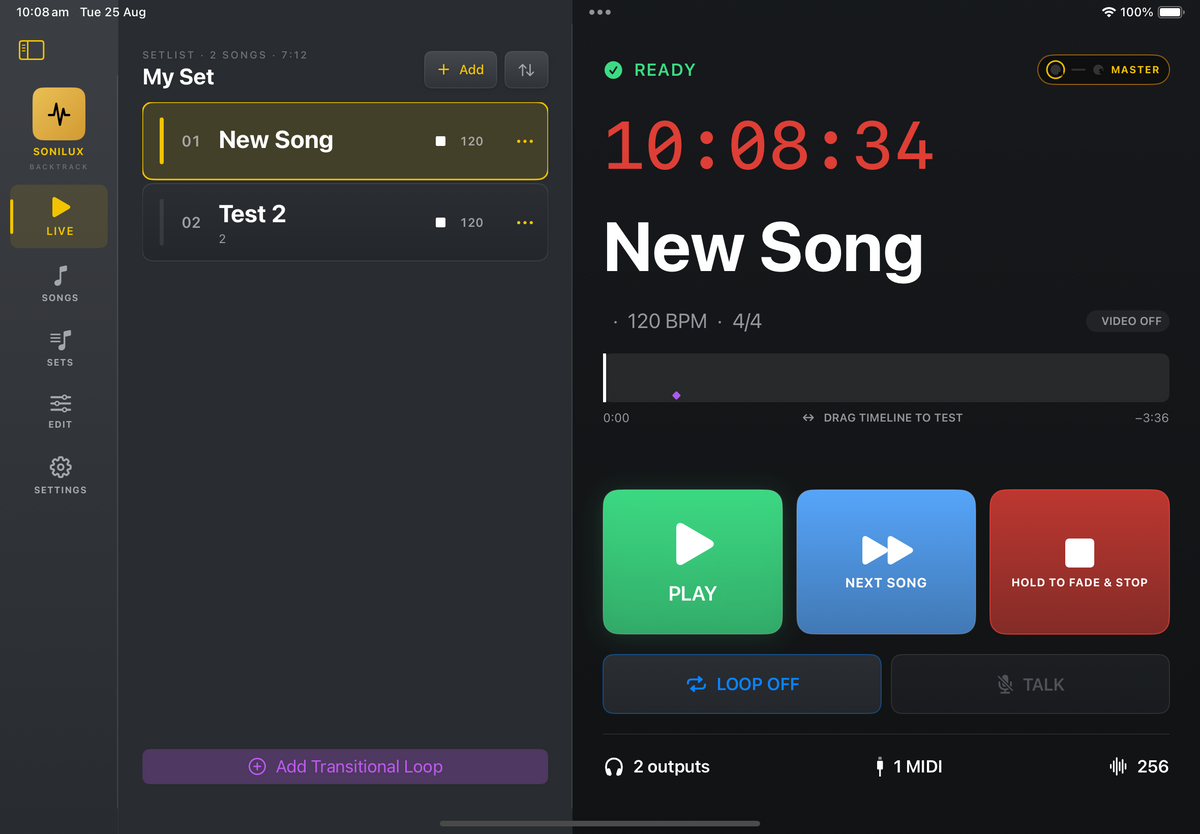
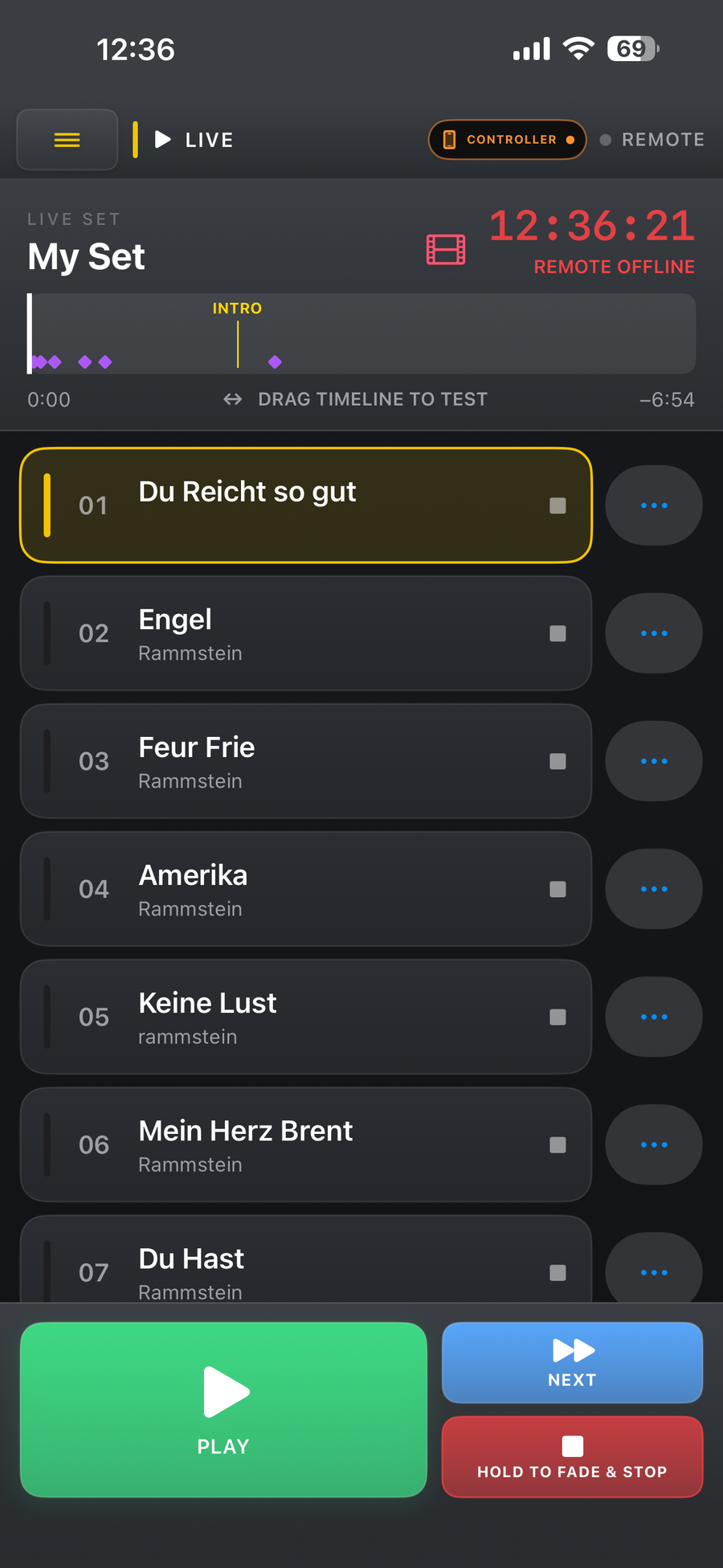
Designed for Mac, iPad and iPhone.
Touring is Easy
Make a Mini Rig
Now touring nationally and internationally can be much easier to pack. Create a mini Rig from as little as an iPhone, Cables and DI
- Send Click to L
- Send Backing to R
- or Even Send Backing to L & R and only Click to L

Redundancy
Plays across Network
BackTrack is built around a Device Link role and connection model, so a standby device is something you can see the state of.
Simply connect to the same unrestricted Wifi and they can Sync
- A second device sits ready as a standby slave & if SoniLink detects a drop out the 2nd Device will continue playing.
- Have a iPhone as a backup for your main IPad
- DeviceLink status, audio-output and MIDI-device counts stay on the live screen
- Press-and-hold protection on Stop and Next, plus a locked Play control
The standby device waits for a deliberate takeover instead of trying to start independent playback. A dropped connection or a missing output is visible before it becomes a silent failure mid-set, not after.

Live performance mode
Clock and status, always visible.
The state of the rig stays on screen for the whole set, rather than buried in a menu.
- Red wall clock
- Ready, Playing, Paused and failure-state feedback
- Active audio-output and MIDI-device counts
- Device Link role, connection status and current-marker readout
A dropped connection or a missing output is visible before it becomes a silent failure mid-set, rather than after.

Live performance mode
A Play control that cannot be fumbled.
Play only is the default, so a song already running cannot be paused by a stray tap.
- Play only (default): the primary control locks and greys out while a song plays
- Play/Pause mode available when you want the same control to do both
- On a manual standby slave the control turns orange and performs a takeover
The orange takeover state means a standby device steps in deliberately, rather than starting independent playback and leaving two machines fighting over the same set.

MIDI Control
Easy Control
Use Bluetooth Midi or even a Pageturner to trigger Songs, the Next Song or other parameters.
As BackTrack Auto Loads the next song, only a single button is needed to run a whole show
- Only one button needed
- Wireless Bluetooth Midi Supported
- Can midi Map Songs, Controls, etc
Pulze Control works perfectly with BackTrack to trigger your next song

Live performance mode
Stop and Next, deliberately hard to trigger.
Both destructive controls sit behind a press-and-hold time you set yourself.
- Immediate Stop or Fade and Stop, with fade configurable from 0.5 to 15 seconds
- Press-and-hold from 0.1 to 3 seconds, on both Stop and Next
- Immediate Stop calls the direct stop path; Fade and Stop calls the fade path
What you choose in settings is what actually happens at the output. The press-and-hold is the difference between a brushed screen and a silent stage.

Redundancy
Plays across Network
The standby device waits for a deliberate takeover instead of trying to start independent playback. A dropped connection or a missing output is visible before it becomes a silent failure mid-set, not after.
Click & count-in
Click Generator
Use your own Click Track or if your song has a set BPM click + Create Click Track
- Click Source: automatic, off, an uploaded audio click track, an imported MIDI click, or a generated click
- Import WAV, MP3 or Midi
- Count-in of off, 4 or 8 in the editor; the data model accepts 0 to 16
- Imported MIDI click is parsed from real MIDI timing, not guessed from audio length
BackTrack parses standard MIDI timing and supported channel messages, identifies the note-on pitches, and presents a high and low click choice for you to confirm before scheduling the pulses.

Audio engine & routing
2, 4 or 8 Audio Outs
Use your devices Headphone output or use a Class Compliant USB Audio interface for multiple outputs
- It Remembers which channels you will use per output map
- Have Click and Call out to (Out 1) and Backings to (Out 1 + 2)
- On 4 Chan, Have Click to 1 + 2, Backings to 1 + 2 + 3 + 4 and Guitar to 4.... etc
- 3 Configurable output maps (Stereo, 4Chan, 8 Chan)
On iPad and iPhone BackTrack follows the active AVAudioSession route; once the system recognises a class-compliant USB interface it rebuilds its engine and switches automatically. MIDI endpoints are tracked separately from audio devices, so a USB MIDI-only connection is never mistaken for USB audio, and BackTrack warns when MIDI is connected but no external audio route is active.

Remote control
Run the show from where you are standing.
Device Link Remote Control puts transport on a second device.
- Send Play, Pause, Stop and song selection from one device to another
- An iPhone on stage can drive a Mac or iPad at the desk or in a rack
- The Controller sends transport commands only, never audio or video
- One Receiver pairs with one Controller at a time
Receiver is the default role when Remote Control is first turned on, so a device will not unexpectedly start controlling another rig.

SoniLink & VSDMX
Sync'd DMX Lighting
SoniLink is BackTrack's native local-network connection to Sonilux VSDMX, separate from Device Link.
- VSDMX Lighting events live on their own lanes, against the same song clock as audio and video
- Automatic or manual lookahead from 50 to 500 ms if you have some latency in your system
- Events tied to a different VSDMX project are blocked until safely relinked
- VSDMX App Sold Seperate
- Or send Midi out to your favourite DMX Lighting Software.
SoniLink shows connection state and connected device name, and measures round-trip latency, jitter and clock offset. It downloads the active project's bank and scene catalogue so events are authored by scene name, and falls back to a configured MIDI destination and channel, bank or preset 1 to 16, when it is not available. It carries lighting control only: it does not transfer songs, media or project settings between devices.

RigBridge
Easy Guitar Patch Changes
With Sonilux RigBridge built in, simply pick your Guitar processor then its preset or footswitch action instead of programming raw Program Change and CC values.
- Choose named actions instead of raw Program Change and CC values for every event
- The Rig Library has many processors such as Ampero, AxeFX Helix, Kemper, Neural Quad Cortec and many more all built in
- EG: Built-in Ampero II map resolves preset A01-1 to CC 0 value 0 then Program Change 3.
Placing a RigBridge action on the timeline resolves it to concrete MIDI messages immediately and saves those messages with the event, so a later rig-library update cannot silently change an existing show. RigBridge is a translation library, not a live connection to the pedal: the event's MIDI lane, output device and channel still determine where the messages are sent.

Set the song up once, correctly.
Every song carries its own tempo, meter and click configuration.
- Song title, BPM, count-in and click source
- Auto Play Next and Loop Until Next Song, stored per song
- Use in Multiple Sets
Recalculating the grid never destructively rewrites imported audio, so a song's meter can be corrected late in rehearsal without re-importing anything.

A lane for every part of the show.
Audio, MIDI, lighting and video each get their own lanes on one timeline.
- Audio tracks, MIDI tracks and one video track per song
- VSDMX lighting tracks kept in their own lanes, separate from ordinary MIDI
- Generated or imported MIDI click tracks, via the click workflow
- Up to 8 audio, 8 MIDI and 8 VSDMX lanes, plus 1 video lane per song
That routing headroom covers a full stems-and-lighting rig without forcing you to bounce parts together before the show.

Swap media without rebuilding the song.
Media can be replaced while the lane and its events stay intact.
- Import, replace or remove audio and video media, keeping the lane intact
- Audio clips carry a timeline offset and can be moved earlier or later
One current boundary worth knowing: clip edge-trimming is not yet a persisted non-destructive trim range. Moving a clip repositions it, it does not change its in and out points.

Name the places you actually talk about.
Markers carry through from the editor into live mode.
- Named markers at an exact song position
- Add preset or custom markers at the playhead
- Shown above the timeline, and visible again in live mode
- Edit name and position, delete, or double-click to edit on Mac
Saved markers sort by position automatically, so the list always reads in the order the song plays.

Import / export
Save your whole project including media to a single backup on iCloud and then import to multiple devices
- Have your Show on multiple devices
- You can then Remote Control & use DeviceLink
See it in action
Watch a set run end to end.
Live performance mode, a standby device taking over, and the song editor behind it.
Who it's for
Built for live work.
Available now
Take BackTrack to the show.
BackTrack runs on Mac, iPad and iPhone.
View on the App Store